You need a computer now, not after three more paychecks. The old laptop is crawling, the screen flickers, and the checkout page is already asking whether you want to split the total into easy payments. If your credit is thin or bruised, pc financing with bad credit feels like the only door that's open, but the question is whether walking through that door leaves you with a usable machine or just a pile of fees and autopay stress.
Table of Contents
- Why Bad-Credit PC Financing Feels Harder Than it Should
- Get Your Foundation Ready Before You Shop
- Comparing the Main PC Financing Options
- Reading the Fine Print on BNPL and Retailer Plans
- Using Secured Cards and Credit-Builder Loans to Rebuild
- Leasing, Refurbished Gear, and Free Alternatives
- Your Same-Day Action Plan
Why Bad-Credit PC Financing Feels Harder Than it Should
A lot of shoppers fixate on approval and miss the larger trap. A four-payment offer can look harmless on the product page, then turn expensive once you add late fees, overdraft charges, and the fact that some plans never help your credit at all. The buyer who needs a laptop for work or school doesn't need a flashy “approved” badge. They need a payment that fits real cash flow.

Start with the products people actually get offered
At checkout, the usual choices are retailer installment plans, buy now, pay later through providers like Affirm, Klarna, or PayPal, personal installment loans, secured credit cards, credit-builder loans, and credit union products. Some of these are designed to move fast, some are designed to build credit, and some just make a purchase feel smaller than it is.
That difference matters because approval doesn't tell you whether the plan is smart. The CFPB's BNPL research shows that users with lower credit scores made up a big share of borrowers, and many loans went to subprime or deep subprime consumers, so the product is built to approve people who may not get a traditional installment loan CFPB BNPL borrower profiles. Approval is easy to mistake for affordability.
Practical rule: If the monthly payment only looks cheap because it's divided into four parts, treat that as a warning, not a win.
The right way to think about pc financing with bad credit is simple. First ask whether the plan will cost more than the computer is worth. Then ask whether the lender reports payments in a way that helps you later. If the answer to either question is murky, move on.
For a quick primer on how credit scores affect what you see at checkout, see this credit score guide.
Get Your Foundation Ready Before You Shop
Do the homework before you click “apply.” Pull your free report, check it for wrong balances or accounts, and fix obvious errors before a lender sees them. A bad file and a bad file with mistakes are not the same thing, and you should not pay extra because a reporting error was never challenged.
Build the purchase around a real budget
Set a monthly ceiling based on your actual bills, not optimism. The question is not what you could stretch for once. It's what you can pay on time every cycle without raiding the grocery money or risking an overdraft. If you need the computer for work, school, childcare, or benefits access, that strengthens the case for financing. If it's mostly for convenience, cash is usually the better answer.
A small down payment changes the math fast. It shrinks the financed balance, lowers fee exposure, and makes it easier to walk away from the worst offers. If you can save a little first, do it. If you can't save anything at all, that's a sign to look hard at refurbished gear, payment plans with the seller, or outside help before borrowing.
Bottom line: Finance only the amount you can repay from the same budget that covers rent, food, and utilities.
Check non-financing paths at the same time
Before you commit, look at 211, nonprofit credit counseling, and utility or medical payment-plan alternatives if the budget is already tight. A computer purchase can be urgent, but urgency is exactly when people accept the most expensive terms. Use the lowest-friction option first, not the first option the store puts in front of you.
For a broader walkthrough of cleanup steps before borrowing, this credit repair guide is a useful starting point.
Comparing the Main PC Financing Options
The best fit depends on what you need the computer to do and what kind of credit profile you're starting from. I'd group the common choices into four buckets: retailer installment plans, BNPL, personal installment loans, and credit union payday alternative loans. One of them is usually less bad than the rest. That's the standard to beat.
| Option | Typical APR | Reports to Bureaus? | Approval Fit for Bad Credit | Main Risk |
|---|---|---|---|---|
| Retailer installment plan | Varies by merchant | Sometimes | Often decent if the store uses a flexible lender | Hidden fees or deferred-interest surprises |
| BNPL | Often advertised as interest-free if paid on time | Often no | Strong for thin or subprime files | Payment stacking and fee exposure |
| Personal installment loan | Usually higher for subprime borrowers | Usually yes | Mixed, depends on income and credit | Higher interest and longer obligation |
| Credit union PAL | Set by the credit union | Usually yes | Good for members who qualify | Smaller loan amounts and membership rules |
BNPL is the easiest approval path for many shoppers, but that doesn't make it the smartest one. If you want to compare split-payment structures against refurbished tech, this split payments for refurbished tech explainer is useful context, especially if you're trying to decide whether a short installment plan is really worth it.
Which option fits which borrower
A credit union PAL can be a strong choice if you're already a member and want a cleaner loan structure. A personal installment loan makes more sense when you want one fixed obligation instead of a pile of little charges. BNPL only belongs on the short list if you're confident you can pay every installment on time and you've checked whether the provider reports your activity.
For a side-by-side overview of loan types, see this loan type comparison guide.
Reading the Fine Print on BNPL and Retailer Plans
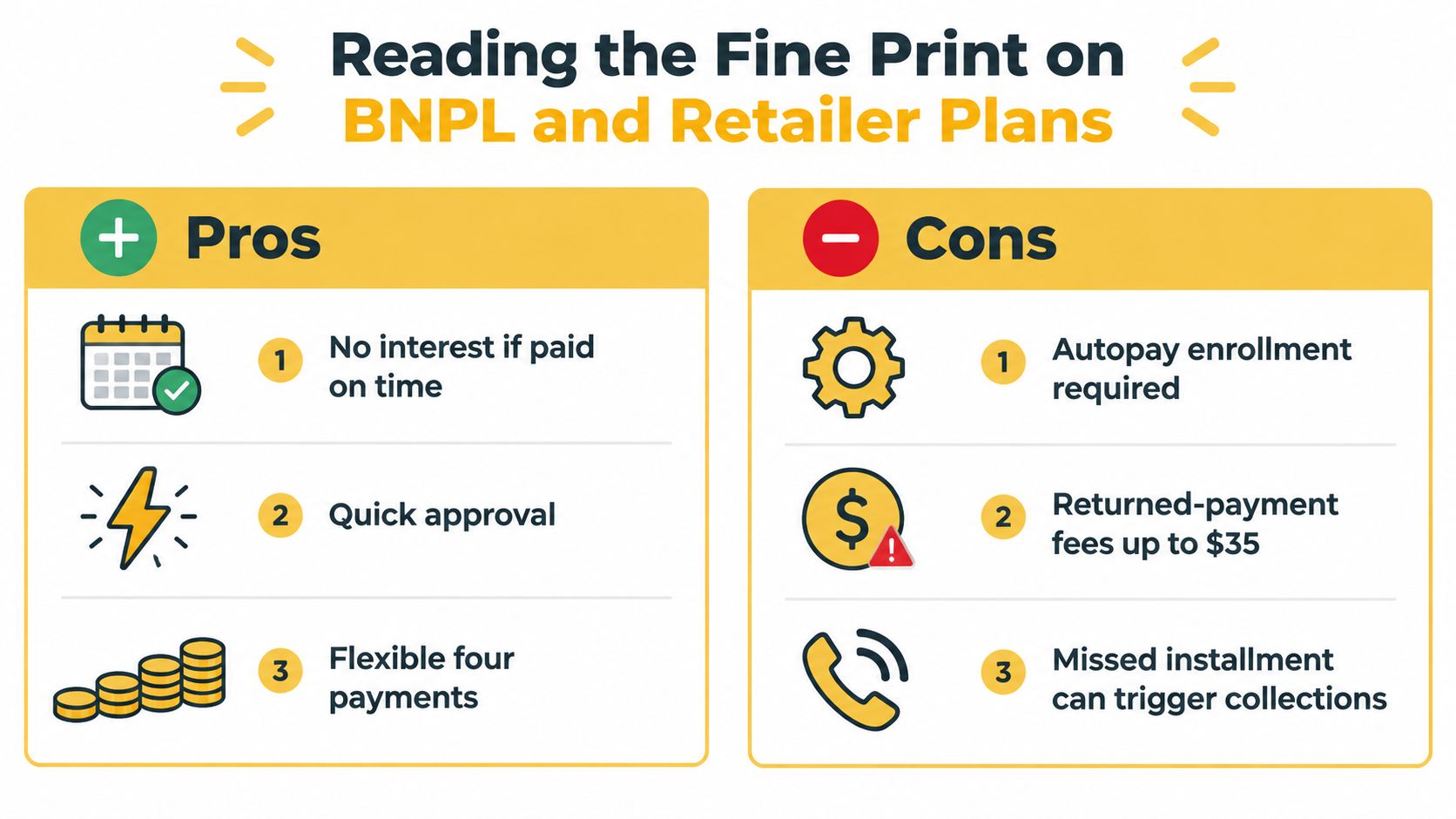
A four-pay plan feels painless until the dates hit your bank account. The plan looks small because each installment is small, but the actual obligation is the total payment schedule plus the fees that show up when timing gets messy. That's the piece most checkout screens hide.
The risk is not just interest, it's timing
The Federal Reserve reported that 11% of BNPL users had a payment trigger an overdraft or nonsufficient-funds fee in the prior year, 26% paid late at least once, and 17% were charged extra for late payment Federal Reserve BNPL market context. Those are not tiny edge cases. They're proof that a “simple” installment plan can collide with a checking account that's already tight.
The CFPB also found that 4.1% of BNPL loans incurred a late fee in 2023 and 1.83% were charged off or deemed uncollectible CFPB BNPL market report. That doesn't mean BNPL is doomed. It means the fee risk is real enough that you should treat it like part of the purchase price.
Stack the dates before you swipe
A computer purchase can turn into two or three overlapping obligations if you already have another BNPL balance running. Each app shows one small charge, but your checking account sees the sum. That's payment stacking, and it's why people get caught by surprise. The monthly burden can look light in the cart and heavy on payday.
If the plan relies on perfect timing, your budget is carrying more risk than the checkout page admits.
Before you click pay, screenshot the due dates, autopay terms, late-fee rules, refund policy, and return window. Also check whether the provider uses a hard inquiry, because some plans are easy to open without giving you the kind of credit benefit you'd want from the hassle. If the total cost is unclear, walk away.
Using Secured Cards and Credit-Builder Loans to Rebuild
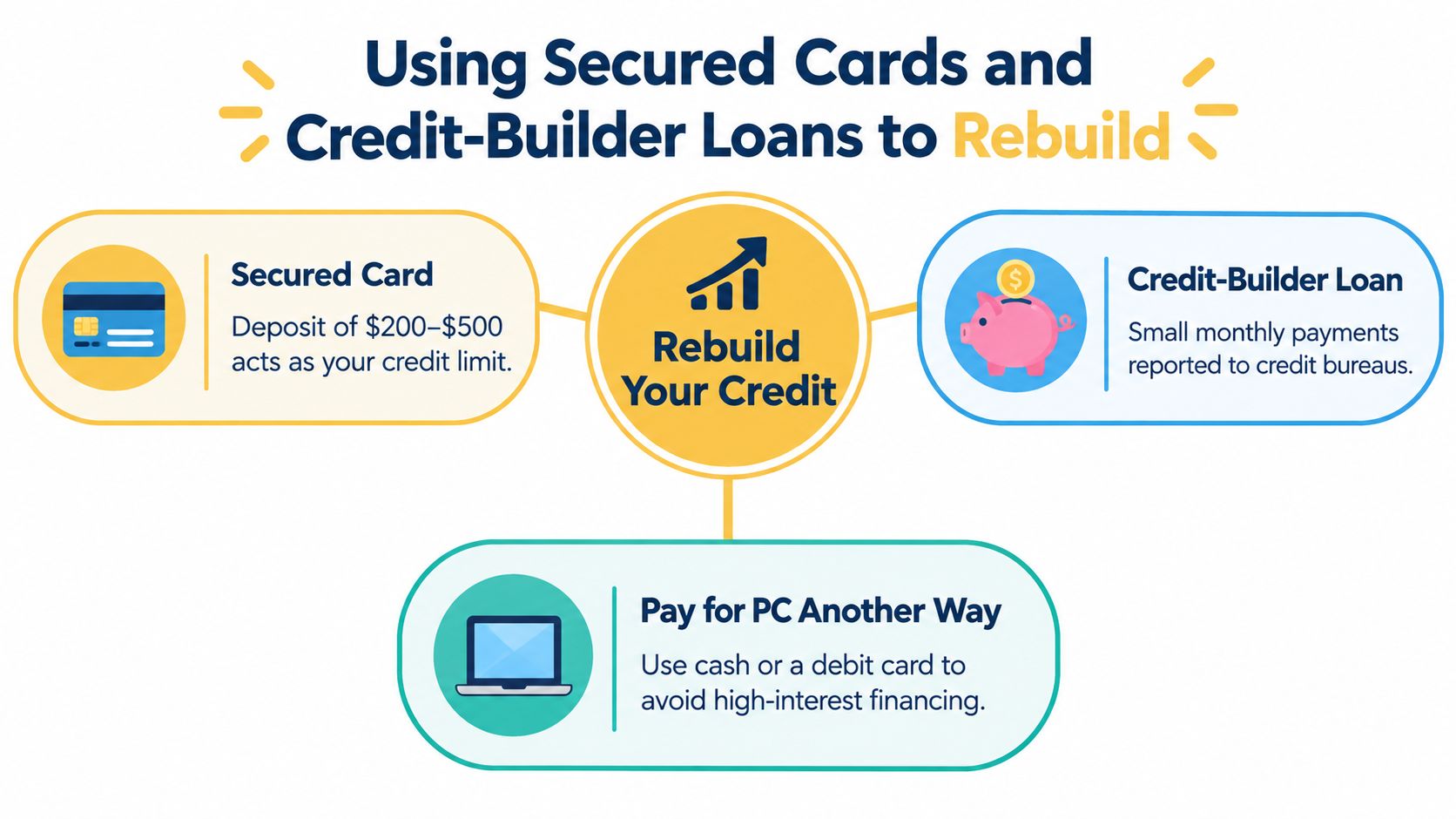
If your goal is both a computer and a better credit profile, don't force the computer purchase to do two jobs. Buy the device another way, then use the financing slot to rebuild your credit with a product that reports cleanly. That's the smarter move for most subprime borrowers.
Secured cards beat vague short-term approval
A secured card requires a deposit, which usually becomes your limit. Use it like a debit card until the habit sticks, keep your utilization low, and pay on time every month. If you need a practical framework for card rebuilding, this credit card guide for bad credit is the right place to start.
Credit-builder loans are even cleaner for some borrowers. You make small monthly payments, the lender reports them, and you're building a payment history instead of just buying breathing room at checkout. That's valuable because BNPL often leaves you with the hassle of repayment and little or no credit-building upside.
The Richmond Fed noted that most BNPL loans are not reported to credit bureaus, so on-time payments may not help your file in the way you expect Richmond Fed BNPL brief. If a product is easy to get but invisible to lenders later, it's not really a rebuilding tool.
How to use the rebuilding products without screwing them up
Set reminders for the first billing date and don't wait for the autopay to save you. If you use a secured card, treat the limit as if it were a small cash envelope, not free money. The whole point is to show consistent behavior, not squeeze every cent out of the limit.
Credit rule: One clean account helps more than three messy ones.
If you can buy the PC with cash or a debit card and reserve your borrowing capacity for a product that builds history, do that. It's the cleaner path and usually the cheaper one. A computer loses value fast. A good payment record can still pay off later.
If you want another practical angle on rebuilding, this credit rebuilding guide from Toya AI is worth reading for comparison.
Leasing, Refurbished Gear, and Free Alternatives
Sometimes the right answer is not financing at all. A decent refurbished machine, a school-lending program, or an employer device stipend can solve the problem without attaching a payment plan to your checking account. That's the move I'd push first when the budget is already fragile.
Buy the function, not the newest sticker
A lease only makes sense when the device is temporary or the user absolutely needs a current machine without up-front cash. Otherwise, you're paying recurring money for something you don't fully own yet. A refurbished or last-generation computer often does the job for less stress, and it removes the question of late fees entirely.
In some jurisdictions, lease-to-own products are constrained by state-level consumer protections, which tells you all you need to know about the risk profile of the product. The monthly payment can look modest while the long-term cost creeps up. That's why I'd rather see someone buy a solid used machine outright than sign a sleek offer that sounds cheap but behaves like a trap.
Use the programs that already exist
Employer device programs, school lending pools, libraries, and nonprofit refurbishers can all be better than a checkout loan. They don't solve every situation, but they can bridge the gap if you need a computer for work, class, or benefits access. If you've got time to compare options, use it.
For readers in Georgia trying to source lower-cost equipment for business use, this refurbished computers for Georgia businesses resource is a practical example of what refurbished options can look like. The same logic applies more broadly, find the machine that works before you pay for the privilege of financing it.
A slightly older laptop bought in cash is often the cheapest computer in the cart, even when a zero-interest offer looks friendlier.
Your Same-Day Action Plan
Do these five things before you choose a payment option. First, pull your free credit report and fix any obvious errors. Second, set a real monthly ceiling that fits your actual bills, not the number that sounds tolerable in the store. Third, list at least three non-financing paths, such as a refurbished machine, an employer or school program, or a local payment plan.
Compare offers by total cost, not by monthly bait
If you're still considering financing, compare the total amount you'll pay, the fee rules, and the refund terms. Ignore any pitch that only advertises the smallest installment. Ask whether the provider reports to credit bureaus, whether a hard inquiry is used, and whether late payment can lead to collections or overdraft exposure. Then set a calendar reminder before the first autopay date so you're not relying on memory.
If an offer is secured by an essential asset, hides the total cost, or pushes you to decide on the spot, walk away. That's not a deal. That's pressure with a payment schedule attached.
A good next step is to use state-specific borrower guides, credit-score-band explainers, and free local help through 211 or nonprofit credit counseling before you commit. Those resources won't sell you a computer, but they'll keep a bad payment plan from turning into a long, expensive mistake.
If you want state-specific guidance, product comparisons, and plain-English borrowing advice for imperfect credit, visit BadCreditMD. You'll find the kind of practical breakdown that helps you compare PC financing with bad credit against better alternatives, without the sales pitch.